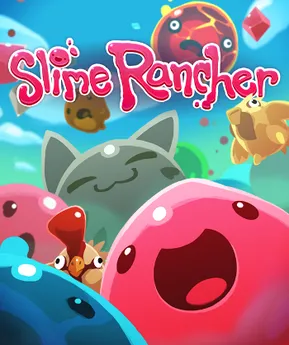
Slime Rancher PC
Explore, farm, and raise adorable slimes in Slime Rancher PC with smooth performance, mods, and endless creative freedom on your computer.
Slime Rancher is a relaxing yet deeply engaging farm life simulation game that blends exploration, resource management, and lighthearted creativity into one colorful experience. Developed by Monomi Park, the game places players in the boots of Beatrix LeBeau, a rancher who travels far from Earth to the mysterious Far, Far Range. Instead of crops or livestock, you collect, raise, and care for adorable bouncing creatures known as slimes. Each slime has its own behavior, diet, and value, turning your ranch into a constantly evolving ecosystem.
Slime Rancher stands out thanks to its beautifully balanced mix of relaxing farming mechanics and light, curiosity-driven exploration. Players use the iconic Vacpack to collect adorable slimes, feed them their favorite foods, and harvest valuable plorts that can be sold on a constantly shifting market, adding a subtle layer of strategy. As progression unfolds, new biomes, gadgets, upgrades, and automation systems gradually open up, transforming a simple ranch into a surprisingly deep management experience. What truly sets the game apart is its unhurried pace there are no harsh penalties or constant pressure, allowing players to experiment, explore, and optimize at their own rhythm. On a computer, this calm yet rewarding gameplay loop feels especially satisfying, making Slime Rancher an ideal choice for players seeking a stress-free but engaging experience.
The game went viral largely because of its charm. From meme-worthy slime reactions to YouTube challenge runs and modded chaos videos, Slime Rancher became a community favorite. Streamers loved its unpredictable physics, while modders expanded the experience with new slimes, mechanics, and visual tweaks. On PC especially, the game gained a second life through mods, performance tweaks, and creative custom content, something mobile or browser versions simply cannot match.
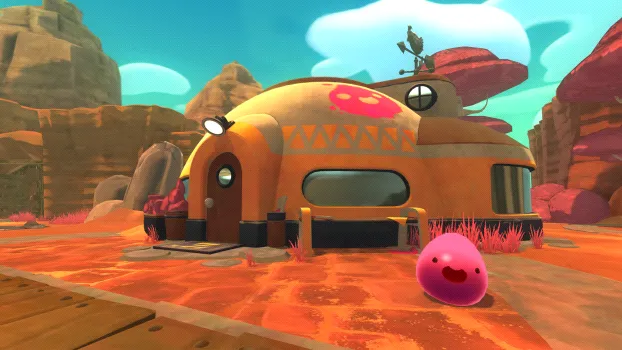
Slime Rancher PC Highlights
The PC version delivers the most complete and flexible way to experience the game. With smooth controls, better visuals, and full mod support, Slime Rancher feels right at home on desktop systems. The larger screen makes exploration more immersive, while keyboard and mouse controls give players precise ranch management. Frequent updates and community tools ensure the PC ecosystem stays active long after first playthroughs.
Open-Ended Ranch Building System
One of the strongest features of Slime Rancher PC is its fully open-ended ranch construction. Players are not forced into rigid layouts or preset designs. You can freely place corrals, gardens, silos, and gadgets wherever you like, creating a ranch that fits your playstyle. This freedom allows beginners to experiment without penalty, while advanced players can design highly efficient production setups. Over time, ranch planning becomes a satisfying puzzle of space management and optimization.
Unique Slime Ecosystem & Behaviors
Every slime species in the game has its own personality, diet, and behavior. Some slimes are calm and easy to manage, while others are aggressive or unpredictable. Feeding slimes correctly produces plorts, which are the core resource of the game. Mixing slimes creates Largo slimes, adding both higher rewards and greater risks. This ecosystem-based design teaches players observation, planning, and balance rather than fast reactions.
Relaxing Exploration-Based Gameplay
Instead of combat-heavy mechanics, Slime Rancher focuses on exploration and discovery. The Far, Far Range is filled with colorful biomes, hidden paths, treasure pods, and secrets waiting to be uncovered. New players are encouraged to explore at their own pace, learning routes and resource locations naturally. On PC, smoother movement and wider screen visibility make exploration more immersive and comfortable during longer sessions.
Dynamic In-Game Economy
The game features a dynamic market system where plort prices fluctuate daily. This encourages players to think strategically rather than selling everything immediately. Storing plorts and waiting for high-value days can significantly boost profits. For beginners, this system introduces light economic decision-making without becoming overwhelming. It rewards patience and planning, making progress feel earned instead of grindy.
H3: Upgrades, Gadgets, and Automation
As players progress, they unlock a wide range of upgrades and gadgets that improve efficiency. Jetpacks, storage expansions, advanced feeders, and automated drones gradually reduce manual work. Automation becomes especially useful as ranches grow larger. This progression system ensures that the game never feels repetitive, teaching new players how small upgrades can dramatically improve productivity over time.
Colorful Art Style and Soothing Sound Design
Slime Rancher uses a bright, cartoon-inspired art style that remains visually appealing even after long play sessions. The colorful environments and expressive slime animations create a cheerful atmosphere that appeals to all ages. Combined with a calming soundtrack and soft sound effects, the game delivers a relaxing experience. On PC, higher resolutions and stable frame rates enhance visual clarity and immersion.
Mod Support and Community Creativity
The PC version benefits greatly from community-created mods that expand gameplay. Mods can add new slime types, improve quality-of-life features, adjust difficulty, or enhance visuals. For new players, mods offer optional customization once they understand the basics. This active modding scene keeps the game fresh and replayable long after the main progression is complete.

Why Play Slime Rancher on PC?
Playing Slime Rancher on PC delivers a noticeably superior experience compared to any other platform. The biggest advantage is performance stability. PC players can enjoy smoother frame rates, faster load times, and adjustable graphics settings that adapt to both low-end and high-end systems. The larger screen size improves visibility when managing multiple corrals, tracking slimes, and navigating large open areas. Unlike mobile devices, there’s no battery drain, overheating, or forced performance throttling during longer play sessions.
Another major reason PC players prefer this version is freedom. Keyboard and mouse controls offer precise movement and quicker inventory management, while controller support remains optional. Most importantly, the modding ecosystem is exclusive to PC. Mods allow players to add quality-of-life features, rebalance mechanics, or even completely transform gameplay. Combined with frequent sales and easy access through platforms like Steam, the PC version offers unmatched value and longevity.
How to Download and Install Slime Rancher on PC
Getting Slime Rancher Game PC is super easy. Follow these steps:
- Scroll up on this page and hit the safe download button for Slime Rancher PC.
- Once the file is downloaded, locate it in your Downloads folder.
- Right-click on the
.zipor.rarfile and choose Extract Here (you can use tools like WinRAR or 7-Zip). - After extraction, a new folder will appear with all the game files.
- Look for the main executable file: Slime Rancher.exe.
- Double-click the
.exefile to start the game. - No installation process is required just click and play.
System Requirements
| Requirements | Minimum | Recommended |
|---|---|---|
| OS | Windows 7 (64-bit) | Windows 10 (64-bit) |
| CPU | Dual-core 2.2 GHz | Quad-core 3.0 GHz |
| RAM | 4 GB | 8 GB |
| GPU | Intel HD Graphics 4000 | GTX 960 / RX 470 |
| Storage | 1 GB available | 1 GB SSD |
How to Play Slime Rancher on PC
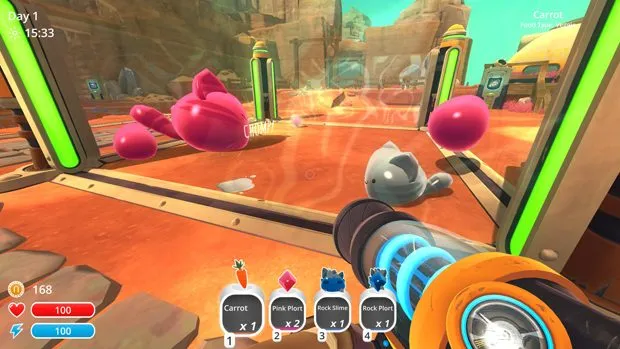
Playing Slime Rancher on PC is designed to be simple for beginners while offering depth as you progress. You control your character using the keyboard for movement and the mouse to aim and operate the Vacpack, which is your main tool throughout the game. The Vacpack allows you to vacuum up slimes, food items, plorts, and resources, as well as shoot them back out with precision. Early gameplay focuses on exploring nearby areas, collecting basic slimes, and learning what each slime eats. Feeding slimes produces plorts, which you sell to earn currency for ranch upgrades. Timing is important, as overfeeding or mixing incompatible slimes can cause problems like Tarr outbreaks, so beginners are encouraged to manage a small number of slime types at first.
As you advance, the gameplay shifts toward planning and efficiency rather than speed. You’ll unlock new zones, each with unique slimes and environmental hazards that require preparation. On PC, managing inventory, swapping tools, and navigating menus feels smooth and responsive, making multitasking easier during busy ranch moments. Players should focus on upgrading corrals, adding air nets, and using auto-feeders to maintain slime happiness. Exploration is best done gradually, returning to the ranch often to avoid losing collected resources. PC players also benefit from optional mod support, which can add quality-of-life improvements such as better UI elements, automation helpers, or visual tweaks. While mods are not required, they can enhance comfort once you understand the core mechanics. Overall, Slime Rancher on PC rewards patience, observation, and smart planning, making it an ideal farm life simulation for relaxed yet engaging gameplay on a computer.
Community & Modding Scene
The PC community plays a huge role in Slime Rancher’s longevity. Modders continuously release new content that expands the base game in creative ways. Popular mods introduce new slime species, biome expansions, automation tools, and visual enhancements. Some mods even rebalance the economy or add challenge modes for veteran players.
Community forums, Discord servers, and mod hubs make it easy to discover and install new content. Custom sound packs, UI tweaks, and quality-of-life mods keep repeat playthroughs fresh. This thriving ecosystem ensures the PC version remains relevant years after release.
Pro Tips for New Players
FAQ
Is Slime Rancher PC suitable for beginners?
Yes, Slime Rancher PC is very beginner-friendly and does not require prior experience with simulation or farming games. The game introduces mechanics slowly, allowing players to learn how to collect slimes, manage corrals, and earn currency at a comfortable pace. There are no strict time limits or fail states, so mistakes are part of the learning process. This relaxed design makes it ideal for new PC gamers as well as casual players.
Can I play Slime Rancher on PC offline?
Yes, once Slime Rancher is installed on your computer, it can be played completely offline. An internet connection is only required for downloading the game or installing updates. Offline play makes it a great option for long sessions without interruptions. This is especially useful for players who prefer single-player experiences without online dependencies.
Does Slime Rancher PC support mods?
Yes, the PC version fully supports mods created by the community. Mods can add new slime types, improve performance, enhance visuals, or introduce quality-of-life features. While mods are optional, they greatly increase replay value for long-term players. Beginners can enjoy the vanilla experience first and explore mods later when they feel comfortable with the game’s systems.
How long does it take to complete Slime Rancher?
A standard playthrough of Slime Rancher PC usually takes around 20 to 30 hours, depending on playstyle. Players who focus on exploration, upgrades, and unlocking all zones may spend much longer. Completionists who aim to collect everything, upgrade fully, and experiment with mods can easily exceed 50 hours. The game encourages slow, relaxed progression rather than rushing.
Is Slime Rancher PC demanding on hardware?
No, Slime Rancher is well-optimized and runs smoothly on most low to mid-range PCs. Players with older systems can lower graphics settings to maintain stable performance. The game’s art style does not require powerful hardware, making it accessible to a wide range of computers. This makes it a good choice for laptops and budget PCs as well.
Can I use a controller to play Slime Rancher on PC?
Yes, Slime Rancher on PC offers full controller support in addition to keyboard and mouse controls. Players can choose whichever input method feels more comfortable. Controller support is especially useful for relaxed, couch-style gameplay. All core mechanics are fully accessible using either control scheme.
Is Slime Rancher PC appropriate for kids?
Yes, Slime Rancher PC is family-friendly and suitable for children. The game features no violence, realistic harm, or inappropriate content. Its colorful visuals, simple controls, and positive tone make it appealing to younger players. Parents can feel comfortable letting kids enjoy the game while also learning basic planning and resource management skills.
Conclusion
Slime Rancher on PC offers the most complete, flexible, and enjoyable way to experience this beloved farm life simulation. With better performance, mod support, customizable controls, and a thriving community, the PC version stands above all others. Whether you’re a casual gamer looking to relax or a creative player who enjoys optimization and exploration, this game delivers long-lasting fun. Use the download button below to safely install the PC version and start building your ultimate slime ranch today.